
A 24/7 Dental Clinic Receptionist in Few Lines of Python
Build a production-ready AI receptionist with appointment booking, modifications, and cancellations using SIPHON.
Overview
Build a fully functional AI receptionist that handles appointment booking, modifications, and cancellations through natural phone conversations.
This tutorial shows you how to create an intelligent voice agent that:
- Books new appointments with calendar integration
- Modifies and cancels existing appointments
- Verifies caller identity for privacy
- Operates 24/7 without human intervention
Time to build: ~15 minutes
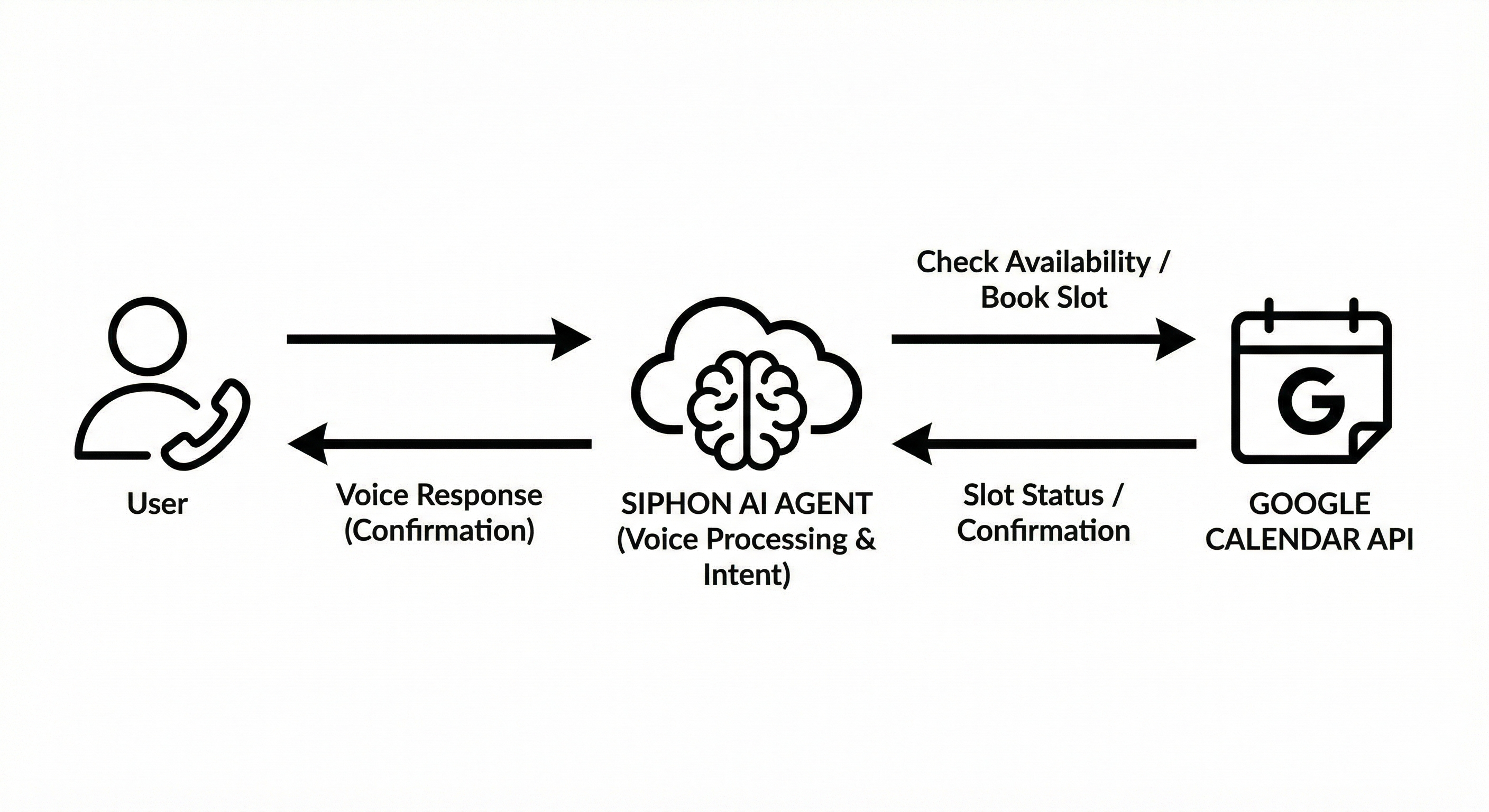
Architecture Flow:
Prerequisites
Before starting, ensure you have:
- Python 3.8+ installed on your system
- SIPHON installed:
pip install siphon-ai(Installation Guide) - API Keys:
- OpenRouter API key (Get one here)
- Sarvam or Cartesia API key for voice (TTS Plugins)
- Services:
- LiveKit credentials (cloud/self-hosted)
- Google Calendar with service account credentials (Setup Guide) - Required for the agent to check availability on your behalf.
Documentation:
- LLM Plugins - Configure language models
- TTS Plugins - Text-to-speech providers
- STT Plugins - Speech-to-text providers
- Agent Configuration - Advanced settings
- Call Data & Observability - Recordings, transcripts, and metadata
Quick Start
Step 1: Create Project
mkdir dental-clinic-receptionist
cd dental-clinic-receptionist
touch .env prompt.py agent.py inbound.py outbound.py
Step 2: Configure Environment
Edit .env:
# LLM Provider
OPENROUTER_API_KEY=your_key

# Voice Providers
SARVAM_API_KEY=your_key
CARTESIA_API_KEY=your_key

# LiveKit Server
LIVEKIT_URL=wss://your-livekit-url
LIVEKIT_API_KEY=your_key
LIVEKIT_API_SECRET=your_secret

# Google Calendar
GOOGLE_CALENDAR_ID=your-calendar@gmail.com
GOOGLE_CALENDAR_CREDENTIALS_PATH=/path/to/credentials.json

# Call Data Features
# These flags enable automatic capturing of call artifacts
CALL_RECORDING=false           # Set to true to enable recordings (requires S3 config below)
SAVE_METADATA=true             # Saves call details (duration, status, cost)
SAVE_TRANSCRIPTION=true        # Saves full conversation history

# Storage Configuration
# Metadata and transcriptions are saved locally by default.
# To save to S3, set METADATA_LOCATION=s3 and TRANSCRIPTION_LOCATION=s3
METADATA_LOCATION=Call_Metadata
TRANSCRIPTION_LOCATION=Transcriptions

# S3 Configuration (Required for Recordings, optional for Metadata/Transcriptions)
# AWS_S3_ENDPOINT=http://localhost:9000
# AWS_S3_ACCESS_KEY_ID=minioadmin
# AWS_S3_SECRET_ACCESS_KEY=minioadmin
# AWS_S3_BUCKET=siphon
# AWS_S3_REGION=us-east-1
# AWS_S3_FORCE_PATH_STYLE=true
Step 3: Create System Prompt
The system prompt defines your receptionist's behavior and conversation workflows.
Create prompt.py with your instructions. For a complete reference, see the example prompt on GitHub.
Basic structure:
system_instructions = """
You are a professional dental clinic receptionist.

# CAPABILITIES
- Book new appointments
- Modify existing appointments
- Cancel appointments

# PRIVACY RULES
- ALWAYS verify caller identity (name + phone) before showing appointments
- Only display appointments for the verified caller

# CONVERSATION STYLE
- Be warm and professional
- Ask one question at a time
- Confirm information by reading it back
"""
Step 4: Create the Agent
Create agent.py:
from siphon.agent import Agent
from siphon.plugins import openrouter, sarvam, cartesia
from prompt import system_instructions
from dotenv import load_dotenv

load_dotenv()

llm = openrouter.LLM()
tts = cartesia.TTS()
stt = sarvam.STT()

agent = Agent(
    agent_name="Dental-Clinic-Receptionist",
    llm=llm,
    tts=tts,
    stt=stt,
    system_instructions=system_instructions,
    google_calendar=True
)

if __name__ == "__main__":
    # One-time setup: downloads required VAD models and assets (only needed on fresh machines)
    # agent.download_files()

    # For local development (logs, quick iteration)
    agent.dev()

    # For production workers, use:
    # agent.start()
Step 5: Set Up Inbound Calls
Create inbound.py:
from siphon.telephony.inbound import Dispatch
from dotenv import load_dotenv

load_dotenv()

dispatch = Dispatch(
    agent_name="Dental-Clinic-Receptionist",  # must match the agent_name used when defining/starting your agent worker
    dispatch_name="inbound-Dental-Clinic-Receptionist",
    sip_number=""  # from your SIP Provider
)

result = dispatch.agent()
print(result)
Run: python inbound.py
Step 6: Set Up Outbound Calls (Optional)
Create outbound.py for appointment reminders:
from siphon.telephony import Call
from dotenv import load_dotenv

load_dotenv()

call = Call(
    agent_name="Dental-Clinic-Receptionist",  # must match the agent_name used when defining/starting your agent worker
    sip_trunk_setup={
        "name": "Dental-Clinic-Receptionist",
        "sip_address": "",
        "sip_number": "",
        "sip_username": "",
        "sip_password": ""
    },
    number_to_call=""
)

result = call.start()
print(result)
Run: python outbound.py
Step 7: Start Your Agent
python agent.py
Your receptionist is now live and ready to handle calls.
Production Scaling: For high-volume production deployments, you can run multiple instances of your agent script horizontally. It automatically distributes calls across available workers. Learn more about Horizontal Scaling
Result
Now your AI receptionist can handle:
New Appointment Booking:
- Patient calls: "I need a cleaning for next Tuesday at 2 PM"
- Agent asks for name and phone number
- Agent verifies details by reading them back
- Agent checks calendar availability
- Agent books appointment and confirms
Appointment Modifications:
- Patient calls: "I need to change my appointment"
- Agent verifies caller identity
- Agent shows only their appointments
- Agent reschedules to new time
- Agent confirms changes
Appointment Cancellations:
- Patient calls: "I want to cancel my appointment"
- Agent verifies identity
- Agent confirms which appointment to cancel
- Agent cancels and confirms completion
Privacy Protection:
- Built-in caller verification (name + phone)
- Only shows appointments for verified caller
- No cross-patient data exposure
Resources
Code & Documentation:
Support:
Found this helpful? ⭐ Star us on GitHub